Tampilkan postingan dengan label Blogger. Tampilkan semua postingan

Mengulas Lengkap Tentang Mobil SUV All-New Grand Vitara 2024 Terbaru

  Mengulas-Lengkap-Tentang-Mobil-SUV-All-New-Grand-Vitara-2024-Terbaru  (www.practicalintroduction.com)


PT Suzuki Indomobil Sales (SIS) resmi menghadirkan All-New Grand Vitara di Tanah Air sejak Maret 2023 lalu.

Pangsa pasar SUV berukuran compact memang panas dan tidak pernah sepi. MG punya ZS, Honda dengan HR-V, Toyota ada Yaris Cross, Mitsubishi Xforce, Hyundai Creta hingga Citroen C3. Dan yang sepertinya masih jarang terlihat di jalanan, Suzuki Grand Vitara 2024.

Permintaan pasar terhadap Suzuki Grand Vitara tak pernah sepi meskipun jumlahnya di pasaran tak begitu banyak.

Berdasarkan data Gabungan Industri Kendaraan Bermotor Indonesia (Gaikindo), penjualan wholesales (pabrik ke dealer) Suzuki Grand Vitara mencapai 1.575 unit selama periode tahun 2023.


Pada kuartal I tahun 2024, angka penjualan mencapai sebanyak 553 unit.


Cukup lumayan untuk mobil impor CBU seperti Grand Vitara di tengah persaingan pasar yang cukup sengit. Ditambah lagi kian gencarnya gempuran mobil-mobil SUV bertenaga listrik yang masuk ke Indonesia.


Desain

Tampilan luar mobil ini secara keseluruhan cukup terlihat sporty, gagah dan modern. Aksen skin plate khas SUV di bemper depan tak jauh beda dari model SUV brand-brand lainnya.  Lampu depan model meruncing pada Grand Vitara sesuai trend mobil yang ada di Indonesia saat ini. 

Demikian pula dengan lampu DRL (Daytime Running Light) serta fitur LED Position Lamp. 

Lekukan bodi bagian samping mengalir aerodinamis dari depan hingga belakang. Meski masih terkesan kaku karena bentuknya cenderung mengotak.

Menggunakan Velg 17 inci sama seperti ukurannya pada mobil-mobil SUV pada umumnya yang terkesan tak terlampau besar. Tampilannya juga tak kalah keren dari brand-brand kompetitornya.

Bagian belakang pun gaya desain lampunya memiliki model memanjang horizontal terlihat modern. 

Bahkan bisa dibilang tidak terlalu konvensional. Tapi ini soal selera saja. Yang penting cahaya lampu rem dan sein sangat terang.


Interior Suzuki Grand Vitara


Salah satu yang harus dipuji dari produk Suzuki Grand Vitara ini adalah kualitas kabin. Suzuki Grand Vitara punya konfigurasi tempat duduk lima orang dewasa memang terkesan lebar dan bisa dibilang lebih lebar dari mobil-mobil SUV pada brand kompetitor di kelasnya.


Dari segi dimensi, lebar bodi 1.795 mm dan jarak sumbu roda 2.600 mm, juga mengindikasikan kabin Suzuki Grand Vitara cukup lapang, terutama pada ruang kaki.


Penumpang yang duduk di jok belakang terbukti tak merasa kesempitan. Lutut serta kaki bisa bergerak leluasa dan tidak mentok ke jok depannya.


Meskipun posisi duduk pada kabin Suzuki Grand Vitara cukup tinggi, namun kepala penumpang berpostur jangkung tidak mentok ke plafon.

Visibilitas ke segala arah baik pengemudi maupun penumpang cukup leluasa, terutama area bangku di baris kedua

Ini keuntungan desain kaku tadi. Atapnya relatif lurus, tidak seperti SUV/Crossover lainnya yang terdapat garis atap melandai ke buritan. Namun kaca belakang dan pilar B yang sempit membuat jarak pandang penumpang baris bangku kedua terbatas.


Agar pengemudi dan penumpang bisa duduk nyaman, jok Grand Vitara bentuknya sedikit melebar pada bagian samping dan belakang. Lekukan sandaran punggung terasa ergonomis dan bisa pas untuk menopang tubuh.


Dashboard Grand Vitara, meskipun tak terlalu hightech, tapi desainnya tetap ‘proper’. Terasa mewah dengan balutan kulit pada semua tipe varian. Tombol fisik juga masih tersedia sehingga tidak bikin bingung pengemudinya. 

Desain setir Grand Vitara juga cukup sporty dan ergonomis. Selain itu terdapat tuas kontrol audio serta hand’s free ponsel. Pada setir juga terdapat paddle-shift untuk memudahkan perpindahan gigi transmisi.


Fitur Cukup

Suzuki Grand Vitara terbilang cukup. Panoramic Sunroof yang saat ini jadi trend pemikat konsumen juga sudah tersedia pada Grand Vitara. 


Pada dashboard terpampang touchscreen berukuran 9 inci yang dilengkapi dengan koneksi Apple CarPlay dan Android Auto. Serta terdapat pula fitur Head-Up Display (HUD). Lengkap dengan wireless charging dan kamera 360°.


Fitur bantu berkendara dan penunjang keselamatan berkendara pun memadai walau tak secanggih beberapa rivalnya yang dibekali sistem ADAS.


Mulai dari sensor parkir, Cruise Control, 6 buah airbag, Electronic Stability Program (ESP) hingga Hill Hold Control ada pada Grand Vitara. Meskipun terkesan fitur yang ‘oldskool’, tapi cukup memenuhi kebutuhan berkendara.


Mesin dan Tenaga

Suzuki Grand Vitara GX Two Tone yang jadi varian teratas mengandalkan mesin 1.5L K15C Dual jet. Dengan teknologi Smart hybrid, Smart Hybrid Vehicle by Suzuki (SHVS), tenaga puncak sebesar 103 hp pada 6.000 rpm dengan torsi puncak 136,8 Nm pada 4.400 rpm.


Dengan dibekali transmisi automatic 6-speed plus tuas paddle-shift, Grand Vitara pun kinerjanya tak kalah dari rival di kelasnya yang kebanyakan pakai jenis CVT.


Teknologi hybrid pada Grand Vitara mencakup Integrated Starter Generator (ISG) dan baterai lithium-ion. Motor ISG pada sistem hybrid SHVS berfungsi untuk meringankan kinerja mesin agar konsumsi bahan bakar jadi lebih efisien. Perangkat ISG ini juga memungkinkan fungsi engine auto start-stop saat berkendara di kondisi lalu lintas stop and go.


Selain itu, motor ISG akan menggantikan kinerja mesin saat mobil melaju pada kecepatan sangat rendah. Hal inilah yang membuat konsumsi BBM Suzuki Grand Vitara relatif jauh lebih irit saat berkendara di kemacetan dalam kota untuk jangka waktu cukup lama.


Untuk pasokan daya listrik sistem hybridnya Suzuki Grand Vitara mengandalkan baterai lithium-ion yang sama dengan Suzuki Ertiga Hybrid yakni 6 Ah. Berbeda dengan Suzuki XL7 Hybrid, baterainya sedikit lebih besar yakni 10 Ah. Baterai lithium-ion ini dijamin garansi resmi selama delapan tahun.


Suspensi

Suspensinya MacPherson Strut dengan Coil Spring pada bagian depan dan Torsion Beam di bagian belakang pada Grand Vitara tak beda dengan compact SUV sejenis di kelasnya.


Seperti yang kami coba, ayunan suspensi bekerja sangat baik meredam goyangan bodi saat bermanuver di tol maupun melibas tikungan. Bantingan suspensi terbilang sedang, tak terlalu empuk tapi juga tak terlampau keras.


Melintasi jalan dengan permukaan sedikit berlubang atau jalan semi off-road pun tak masalah berkat jarak ground clearance di angka 210 mm yang terbilang relatif cukup tinggi.


Kabin mobil ini pun cukup kedap, terutama saat melintas di jalan tol. Gesekan antara ban dengan permukaan jalan beton biasanya membuat dengung. Tapi hal ini tak terdengar saat berada di dalam kabin Suzuki Grand Vitara meskipun melaju cukup kencang di tol.


Harga Suzuki Grand Vitara 2024

Seperti diketahui, Suzuki Grand Vitara di Indonesia ditawarkan dengan harga di bawah Rp 400 jutaan. Masih terjangkau dan relatif kompetitif dibandingkan kompetitor lainnya yang bahkan tembus Rp 450 jutaan.

Saat ini harga Suzuki Grand Vitara 2024 berdasarkan situs resminya adalah sebagai berikut:

  • Grand Vitara GL: Rp 359,4 juta

  • Grand Vitara GX: Rp 384,4 juta

  • Grand Vitara GX (dual tone): Rp 387,4 juta


Jika dibandingkan dengan pesaingnya, harga Suzuki Grand Vitara jelas lebih terjangkau. Fitur yang dibekalkan serta kualitas kenyamanan berkendara meski tidak ada ADAS, cukup untuk melayani kebutuhan berkendara.


Share:

Alexa Rank - SEO Tool for Website Popularity Measurement

There are many website analysis tools out there. One of the most famous is Alexa. This Amazon-owned marketing tool provides complete data on a website and also gives you a website ranking based on their data, called Alexa Rank.


https://www.practicalintroduction.com/2021/08/alexa-rank-is-seo-tool-that-utilized.html


What is Alexa Rank?

Alexa Rank is a marketing tool that uses website traffic data to rank popular websites. Alexa Rank is widely used by businesses to analyze the competition. Alexa Rank is determined by combining data on the estimated number of website visitors and how many pages are visited by website visitors. Alexa itself was originally a company in California that was founded in 1996 and was taken over by Amazon in 1999. Alexa is focused on collecting website traffic data. 

Initially, you will need toolbars and browser extensions to collect data. With this data, Alexa helps businesses grow. One of them is the Wayback Machine, an Internet archive. But their most popular product is Alexa Rank – a metric that ranks websites according to their popularity or how many people have accessed and used the website in the last three months.


How is Alexa Rank Composes Ranking?

According to Alexa's official explanation, their ranking is calculated by combining the number of daily visitors with the number of page views a website has had in the last three months. This data is collected from internet users who use one of the 25,000 browser extensions on Google Chrome, Firefox, or Internet Explorer that install the Alexa script on it. Then Alexa uses their algorithm to correct the data that it feels is biased to provide more accurate data. 

In addition, there are several websites that have Alexa coding on their websites so that Alexa knows how many people are coming to the website more accurately. Because the data collected from the use of internet users is only an estimate. There are also those who say that Alexa uses data from third parties in order to provide data from wider sources. You can immediately use Alexa Website without having to install extensions tools or widgets. The rankings are available globally and by country.


How to Check Alexa Rank

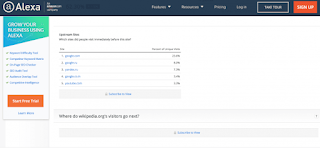
You just need to visit the official Alexa website. As you can see in the screenshot above, you just need to enter the domain of the website you want to check and click Find. After that, you will see a results page that contains detailed data about the website. For this article, we included Wikipedia.


https://www.practicalintroduction.com/2021/08/alexa-rank-is-seo-tool-that-utilized.html


The first thing you will see is the global ranking and the ranking of the website in the country you choose. 


https://www.practicalintroduction.com/2021/08/alexa-rank-is-seo-tool-that-utilized.html


In addition, Alexa also provides website visitor data, which, unfortunately, can only be seen if you use Alexa's paid plan. However, you can see the geographic location of Wikipedia visitors, and the details are on the right. For free access, they only show the five countries that access Wikipedia the most. 

In the next section, you can see the engagement on the website you entered. As you can see in the image below, you can see the bounce rate, the number of pages accessed by each visitor, and how long someone spends on Wikipedia.


https://www.practicalintroduction.com/2021/08/alexa-rank-is-seo-tool-that-utilized.html


Below that, you can see where people found access to the Wikipedia website and what keywords people used to find Wikipedia.


https://www.practicalintroduction.com/2021/08/alexa-rank-is-seo-tool-that-utilized.html


If you want to know more, Alexa also provides data about what websites visitors access before they enter the Wikipedia website and what websites they visit after they leave the Wikipedia website (paid feature).


https://www.practicalintroduction.com/2021/08/alexa-rank-is-seo-tool-that-utilized.html


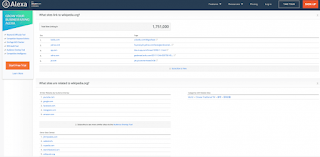
Not only that, but they also tell you which websites provide backlinks to Wikipedia and other websites related to Wikipedia.


https://www.practicalintroduction.com/2021/08/alexa-rank-is-seo-tool-that-utilized.html


Alexa also tells you which pages or subdomains (if any) your website visitors have visited. After that, you can see that Alexa also tells you how fast (or slow) the website is loading.


https://www.practicalintroduction.com/2021/08/alexa-rank-is-seo-tool-that-utilized.html


Finally, Alexa tells you where you can get more information about the website you are checking. There are also additional demographic data about website visitors at the very bottom.


How to Increase Alexa Rank

If you use WordPress, you can directly install the Alexa Rank Widget plugin. Here are some ways you can increase the Alexa Rank of your website:


Install the Alexa toolbar

As mentioned earlier, in order for your website data to enter the Alexa database, you need to install the Alexa toolbar or extensions on your browser. So the first step you have to take to increase your Alexa rank is to install the Alexa toolbar. Every time you visit your website, the data will be entered into the Alexa database. This can help the Alexa Rank of your website to experience a significant increase. To install the Alexa toolbar, all you have to do is visit the Alexa toolbar download page and follow the steps.


Install the Alexa widget on your website.

In addition to the toolbar, you also need to install the Alexa widget on your website. Why? The Alexa toolbar only records the visits that come from your browser. So, if your website visitors do not have the Alexa toolbar, their visits will not be counted by Alexa. Then, how to solve it? Install the Alexa widget on your website. The Alexa widget on your website counts all visits to your website. Although there is still debate about the accuracy of Alexa Rank, Alexa can be a tool that helps you evaluate a website. Hope this article helps. Thank you all for visiting my blog and wait for the next update. 😊

Share:

Advantages of Google Analytics 4 (GA4) - (Latest Update)

Google Analytics has just released the latest version of its service, Google Analytics version 4 or referred to as GA4.  GA4 was released in October 2020, and still needs further improvisation.


Even though it's still a baby, in fact GA4 can offer various advantages that you can't find in GA3 or Universal Analytics.  What are they?


5 Advantages of Google Analytics 4 (GA4)


https://www.practicalintroduction.com/2021/08/%20Advantages-of-Google-Analytics-4-GA4-Latest-Update.html


In the previous version of analytics, you are certainly quite dizzy if you have to do activity tracking, especially those related to clicks.  In addition, Universal Analytics also has limitations that can make your data difficult to digest.


One of the changes that are quite notable is the abolition of the concept of Bounce Rate or bounce rate.  Instead, GA4 provides the metric Engagement Rate, which is the ratio of visitor activity to total Page View.


Of course this is easier to understand because it uses a "positive" understanding rather than a "negative" understanding.  And not only that, here are 5 new features provided by GA4 to help your website tracking needs:


Automatic Track Click

If in the previous version you couldn't get click event information automatically, then in GA4 clicks can be tracked automatically.


This is thanks to the presence of the enhanced measurement feature in the GA4.  You no longer need to manually define click events, either via Tag Manager or manually with the help of javascript.


It's still not perfect, and not all types of clicks can be read automatically.  But for those who are not very familiar with the technology from Google Analytics, this feature will certainly be very helpful.


Page View Becomes Event


In previous versions, Page View was categorized in session level.  In GA4, Page View has become the same event as click or visit.  This makes it easier for you to collect data, considering that you don't have to consider complex scopes like in previous versions of Analytics.


Page View itself also has parameters, just like events in general.  Makes checking data in Page View easier.


Support Debug View


In Google Analytics version 3, you can't debug easily.  It's still possible to debug, but you need sufficient advanced coding knowledge to understand what it means, even for code knowledge outside of analytics itself.


In GA4, that's not the case.  Because the debug method in GA4 already supports a much simpler Graphic User Interface.  If you've ever used preview mode on the Facebook Pixel or Tag Manager, then GA4 is not much different than the two.


Can Display Full URL Without Additional Configuration


This is the most exciting thing from GA4, you no longer need to set additional filters if you want to know the full URL of the page view or event that occurs.


In GA3, you can only see the page path of the displayed URL.  Of course, you can still set filters manually to get similar reports, but you still need extra effort and special knowledge to get the data you want.


This feature is especially helpful if you are using a subdomain (example: blog.example.com).  Given the subdomain will not be shown in the usual Analytics reports.  But in GA4, all URLs will be displayed full by default.


Flexible Event Parameters


In GA3, you are only limited to 4 event parameters, namely Category, Action, Label, and Value.  In GA4, now you can add event parameters according to your own definition and of course there is no standard in naming these events.


Upgrade Google Analytics to GA4 with Setup Assistant


Interested in upgrading?  If you are already using GA3 with gtag.js, then you can easily upgrade via the Setup Assistant which you can find in the Admin menu in the Property section.


You then just put the GA4 config gtag into the global site tag that you have installed, or as simple as adding the GA4 tag in Google Tag Manager, if you are already using it.


Share:

How to Determine Quality Keywords for Writing Articles in Blog and Website

On this occasion, Mimin will share one way to determine quality keywords to be used as material for making articles later. But before that, let's first look at a brief explanation of keywords.

What are the keywords?

A Keyword is a word or series of words used by someone to search for information on the internet through search engines, such as Google, Yahoo, and Bing. Keywords are divided into two categories, namely short-tail keywords and long-tail keywords.

Short Tail Keyword (STK) is a keyword that only consists of one word, such as Facebook, Google, Yahoo, Twitter, Wikipedia, and others. This STK will later be connected to a blog or website along with the article, through their respective URLs.

Long Tail Keywords (LTK) are keywords that consist of several words and can be formed into a sentence, such as how to get rich, how to blog, what are keywords? cooking tutorials to be a good mother, the internet, and so on. This LTK is more directed at an article on a blog or website. In addition, LTK plays an important role in SEO because of its wider use compared to STK.


If you want to learn more about keywords, you can search for them directly on Google. Next, let's look at one way to determine quality keywords to be used as material for writing articles.


1. Open the Ubersuggest site or you can simply "Click Here".

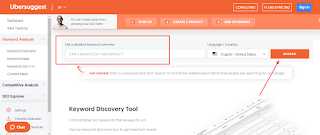
2. Enter keywords either STK or LTK as you wish, such as AdSense or what is AdSense. Don't forget to change the country's location according to the location of the destination country and the language used by your blog or website. Next, click Search.

https://www.practicalintroduction.com/2021/08/how-to-determine-quality-keywords-for.html

3. After that, scroll down and various keywords will appear related to the keywords you typed earlier. Here, you can see how many people found that keyword, how high the CPC (Cost Per Click) was for that keyword, and how difficult it was for you to find that keyword with other users.

4. To determine quality keywords, you can see how many publishers there are. The higher the number of publishers, the better the quality of the keyword. However, the competition will be more difficult for these keywords. Therefore, look for keywords that have a large number of publishers but little competition, to make it easier for you to be first in the search.

In addition, you can use keywords that have a small number of publishers and competitors to make it easier to enter the first page of searches. Even with keywords that have a small number of publishers, but manage to enter the first page of search results, this will increase your Alexa Global Rank, which makes your blog or website more popular.

5. After determining which keywords you will use, enter these keywords in the title of the article and also in the content of the article later.

Example:

For example, We will choose the keyword "AdSense on Blog" on the second page of the keyword data that we have entered previously, namely AdSense. Then we created a new article with the title "How to Register for AdSense on a Hosted Account Only Blog". After that, we changed the content of the article by including the keyword in the first 100 words to make it more SEO.

That's it for the article How to Determine Quality Keywords for Writing Articles This Time. Hopefully, it will be useful. Thank you all for visiting my blog and wait for the next update. 😊

Share:

How to Set The Appearance of The Mobile Version of The Blog to be Mobile Friendly

Each blog template has its own HTML or coding code that you can change or edit according to your taste, but remember. To edit the appearance of the blog or the appearance of the blogger template so that it is SEO friendly, you must know how to edit the mobile version of the template, so that when people open your blog or access your blog using mobile or cellular, it looks like the desktop version, but using mobile. Everyone has a smartphone that is used to access the internet, thus increasing the number of blog views or the number of accesses to your website or blogger. 

On this page, we will discuss how to set the mobile version of the blog display to make it mobile-friendly. There are several ways that you can do so that the appearance of your blog appears in the mobile version. This method is very powerful for increasing the number of visits to your blog or for getting unique and many blog visitors. Let's go straight to the topic of discussion on how to change the appearance of the blog to the mobile version, or how to set up the desktop version of the blog using the mobile version. 

1. First, please "login" to your blog using the email account and password that you have created. 

2. Change the language to the language of your country to make it easier to operate the mobile-friendly template display. 

3. Then you select "Theme" as shown below.


https://www.practicalintroduction.com/2021/08/how-to-set-appearance-of-mobile-version.html


4. After you select the theme, it will appear to the right of "custom (Modified)". Then click CUSTOMIZE. 


https://www.practicalintroduction.com/2021/08/how-to-set-appearance-of-mobile-version.html


5. Then the next column will appear where you select "Mobile Settings".


https://www.practicalintroduction.com/2021/08/how-to-set-appearance-of-mobile-version.html


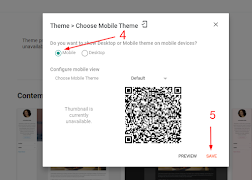
6. Next, the Mobile Theme (Mobile Friendly) column will appear and choose "Mobile". If so, click SAVE.


https://www.practicalintroduction.com/2021/08/how-to-set-appearance-of-mobile-version.html


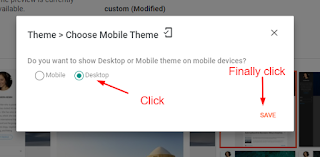
7. If you want to display the mobile version of the blog, or when the blog page is accessed using a smartphone, but the page display is the same as using a desktop. Then you select "desktop", as shown below. Then the appearance of the blog will be in accordance with what you want.


https://www.practicalintroduction.com/2021/08/how-to-set-appearance-of-mobile-version.html


8. The admin blog uses the "desktop" option. Please try to access the admin blog using a smartphone to find out the results of the "desktop" option. 

Well, that's how to change the appearance of the mobile version of the blog or the desktop version by using the two options above. Hopefully, this article can help you. 

Thank you all for visiting my blog and wait for the next update. 😊

Share:

How to Make Posts on "Blogger.com" For Beginners

Hi, While I have just created a new blog, I want to make a post about How to Create a Blog on Blogger.com for Beginners. Some friends also want to be taught to create a blog. In my opinion, creating a new blog will be easier if you use a laptop. Well, now I will write the guide. Hope it can be useful.

1. First, we go to our blog dashboard, go to Blogger.com and select the blog where we will add a new entry or new post. Then click NEW POST.

2. Then create a new post in the space provided. My advice, first to make a draft of the writing in Microsoft Word or in Notepad, then you can copy-paste it in the column to write posts.


3. If we check on the right, there is a label ("Labels") that must be filled in according to the contents of the post. For example, if we wrote about "Italy vs England Match Prediction in the Euro 2020 Final", we could label it "Final, Euro 2020, Italy, England". We can write more than one original label separated by commas. The important thing is that the "Labels" connect with the content of the writing.


Then in the Schedule section ("Published on"), you can choose "Automatic", which means that when you save and publish the article, the date listed is on the spot. If you choose "set date and time", you can make a scheduled post (Custom).


4. In the "Link" option, I prefer "Custom Permanent" Links more often. Why? Because the post title and link are not appropriate (the post link is shorter than the post title).


My post is entitled "How to Convert PDF to JPG online. URL/link Sleep only "https://cnsworlds.blogspot.com/2021/07/italy-vs-england-match.html"

But by selecting Custom Permanent Link I can add words in the URL/link to "https://cnsworlds.blogspot.com/2021/07/italy-vs-england-match-prediction-in-the-euro-2020-final.html"

5. Writing on blogs without pictures looks less attractive. So, they must be given at least one image. When writing about a book, there must be a picture of the book. Writing about culinary, there must also be a picture of the food menu. Especially if you are writing about tourist attractions, you must also include pictures of the tourist destinations.

So please click "Insert image" then upload the image or photo that we want to add.


6. After uploading the image, choose which one to insert.

7. We can also set the image size: Small-Medium-Large-Extra Large-Original size. And then click "UPDATE"


9.  Finally, you can click Publish, our new post has become.

That's how to make a post on Blogspot (Blogger.com) for beginners. Wait for the next post about creating a blog on Blogspot. May be useful!

Thank you all for visiting my blog and wait for the next update. 😊

Share:

Happy Wolrd Teacher Day

Daily Page View

Label

Adobe Acrobat Adobe Photoshop Alexa Rank Andorid Application Art Austria BUMN Beginner Belgium Blog Community Blogger Bupati Gresik CPNS/PPPK Canada Coin Market Cap Computers Cosmology Cryptocurrency Dancing Denmark Doctoral Doker Education Educational Excel Excel Table Features Film Finland French Gadget Gallery Garuda Emas Germany Google Analytics Google Form Hardware Homestay Hong Kong Ilovepdf Indrawan Vpp Interior Design Ireland Italy KKPR dan PKKPR Kampung hijau Karang Taruna Karir/Career Keyword Keywords LKPM LaTeX Linux Lowongan Kerja BUMN/SWASTA Mac Majalah Tech Material Physics Material Physics. Mechanical Engineering (ME) Microsoft 365 Microsoft Excel Microsoft Office Microsoft PowerPoint Microsoft Word NFC Nero Nero Burning 2021 Networking New Technology OSS RBA OTOMOTIF Operating Systems Optic PDF PT Aerotrans Services Indonesia (Garuda Indonesia Group) PT Astra Tol Nusantara (ASTRA Infra) PT Indomarco Prismatama (Indomaret Group) PT Indonesia Epson Industry PT Jakarta Industrial Estate Pulogadung PT Pertamina Training & Consulting (PTC) PT. Indofarma (Persero) PT. Kimia Farma Group Perizinan Berusaha Persetujuan Lingkungan Pinjaman Online Posgraduate Postgraduate PowerPoint Presentations Profil Perusahaan/Company Profil Profil-Perusahan Publisher Pyrolysis Quantum Computing Quantum Physics Quiz Renewable Energy Research SEO SWASTA Scholarship Semi conductor Semiconductor Sertifikat Halal Smartphone Spintronic Study Abroad Super Capasitor Superconductor Tata Cara Pendaftaran Surat Izin Usaha Industri (SIUI) Technology Tecnology Thailand The Best Trip & Travel Tutorial United Kingdom United Stated United States VGA card Website Windows 365 Windows Tips Word Document WordPress Zero Waste chromium tricks font iphone iphone 13 Pro iphone 13 Pro Max iphone 13 Pro Max gsmarena online zodiak