Basic Understanding of Dmain Name Server DNS Blacklists
Advantages of Google Analytics 4 (GA4) - (Latest Update)
Google Analytics has just released the latest version of its service, Google Analytics version 4 or referred to as GA4. GA4 was released in October 2020, and still needs further improvisation.
Even though it's still a baby, in fact GA4 can offer various advantages that you can't find in GA3 or Universal Analytics. What are they?
5 Advantages of Google Analytics 4 (GA4)
In the previous version of analytics, you are certainly quite dizzy if you have to do activity tracking, especially those related to clicks. In addition, Universal Analytics also has limitations that can make your data difficult to digest.
One of the changes that are quite notable is the abolition of the concept of Bounce Rate or bounce rate. Instead, GA4 provides the metric Engagement Rate, which is the ratio of visitor activity to total Page View.
Of course this is easier to understand because it uses a "positive" understanding rather than a "negative" understanding. And not only that, here are 5 new features provided by GA4 to help your website tracking needs:
Automatic Track Click
If in the previous version you couldn't get click event information automatically, then in GA4 clicks can be tracked automatically.
This is thanks to the presence of the enhanced measurement feature in the GA4. You no longer need to manually define click events, either via Tag Manager or manually with the help of javascript.
It's still not perfect, and not all types of clicks can be read automatically. But for those who are not very familiar with the technology from Google Analytics, this feature will certainly be very helpful.
Page View Becomes Event
In previous versions, Page View was categorized in session level. In GA4, Page View has become the same event as click or visit. This makes it easier for you to collect data, considering that you don't have to consider complex scopes like in previous versions of Analytics.
Page View itself also has parameters, just like events in general. Makes checking data in Page View easier.
Support Debug View
In Google Analytics version 3, you can't debug easily. It's still possible to debug, but you need sufficient advanced coding knowledge to understand what it means, even for code knowledge outside of analytics itself.
In GA4, that's not the case. Because the debug method in GA4 already supports a much simpler Graphic User Interface. If you've ever used preview mode on the Facebook Pixel or Tag Manager, then GA4 is not much different than the two.
Can Display Full URL Without Additional Configuration
This is the most exciting thing from GA4, you no longer need to set additional filters if you want to know the full URL of the page view or event that occurs.
In GA3, you can only see the page path of the displayed URL. Of course, you can still set filters manually to get similar reports, but you still need extra effort and special knowledge to get the data you want.
This feature is especially helpful if you are using a subdomain (example: blog.example.com). Given the subdomain will not be shown in the usual Analytics reports. But in GA4, all URLs will be displayed full by default.
Flexible Event Parameters
In GA3, you are only limited to 4 event parameters, namely Category, Action, Label, and Value. In GA4, now you can add event parameters according to your own definition and of course there is no standard in naming these events.
Upgrade Google Analytics to GA4 with Setup Assistant
Interested in upgrading? If you are already using GA3 with gtag.js, then you can easily upgrade via the Setup Assistant which you can find in the Admin menu in the Property section.
You then just put the GA4 config gtag into the global site tag that you have installed, or as simple as adding the GA4 tag in Google Tag Manager, if you are already using it.
How to Determine Quality Keywords for Writing Articles in Blog and Website
On this occasion, Mimin will share one way to determine quality keywords to be used as material for making articles later. But before that, let's first look at a brief explanation of keywords.
What are the keywords?
A Keyword is a word or series of words used by someone to search for information on the internet through search engines, such as Google, Yahoo, and Bing. Keywords are divided into two categories, namely short-tail keywords and long-tail keywords.
Short Tail Keyword (STK) is a keyword that only consists of one word, such as Facebook, Google, Yahoo, Twitter, Wikipedia, and others. This STK will later be connected to a blog or website along with the article, through their respective URLs.
Long Tail Keywords (LTK) are keywords that consist of several words and can be formed into a sentence, such as how to get rich, how to blog, what are keywords? cooking tutorials to be a good mother, the internet, and so on. This LTK is more directed at an article on a blog or website. In addition, LTK plays an important role in SEO because of its wider use compared to STK.
If you want to learn more about keywords, you can search for them directly on Google. Next, let's look at one way to determine quality keywords to be used as material for writing articles.
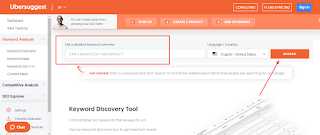
1. Open the Ubersuggest site or you can simply "Click Here".
2. Enter keywords either STK or LTK as you wish, such as AdSense or what is AdSense. Don't forget to change the country's location according to the location of the destination country and the language used by your blog or website. Next, click Search.
3. After that, scroll down and various keywords will appear related to the keywords you typed earlier. Here, you can see how many people found that keyword, how high the CPC (Cost Per Click) was for that keyword, and how difficult it was for you to find that keyword with other users.
4. To determine quality keywords, you can see how many publishers there are. The higher the number of publishers, the better the quality of the keyword. However, the competition will be more difficult for these keywords. Therefore, look for keywords that have a large number of publishers but little competition, to make it easier for you to be first in the search.
In addition, you can use keywords that have a small number of publishers and competitors to make it easier to enter the first page of searches. Even with keywords that have a small number of publishers, but manage to enter the first page of search results, this will increase your Alexa Global Rank, which makes your blog or website more popular.
5. After determining which keywords you will use, enter these keywords in the title of the article and also in the content of the article later.
Example:
For example, We will choose the keyword "AdSense on Blog" on the second page of the keyword data that we have entered previously, namely AdSense. Then we created a new article with the title "How to Register for AdSense on a Hosted Account Only Blog". After that, we changed the content of the article by including the keyword in the first 100 words to make it more SEO.
That's it for the article How to Determine Quality Keywords for Writing Articles This Time. Hopefully, it will be useful. Thank you all for visiting my blog and wait for the next update. 😊